Labrador Setup Guide
Overview
Labrador is a React-based clinical trial study finder widget that can be embedded into any website. It provides a comprehensive interface for searching, filtering, and viewing clinical trial information. This guide will walk you through the setup and integration process.
Table of Contents
Prerequisites
Before setting up Labrador, ensure you have:
- Access to WeTrials API (API key required - see API Key Guide)
- Basic knowledge of HTML/JavaScript
Installation Method
CDN Integration
The recommended way to integrate Labrador is by including it via CDN in your HTML:
CDN Base URLs
| Environment | Base URL |
|---|---|
| Development | https://assets.dev.wetrials.com/labrador/v2/ |
| Production | https://assets.wetrials.com/labrador/v2/ |
Basic Integration
html
<!DOCTYPE html>
<html lang="en">
  <head>
    <meta charset="utf-8" />
    <title>Your Website with Labrador</title>
    <meta name="viewport" content="width=device-width, initial-scale=1" />

    <!-- Google Fonts (Required) -->
    <link href="https://fonts.googleapis.com/css2?family=Poppins:wght@300;400;500;600;700&display=swap" rel="stylesheet" />

    <!-- Labrador Styles -->
    <link rel="stylesheet" href="https://assets.wetrials.com/labrador/v2/styles.css" />
  </head>
  <body>
    <!-- Container for Labrador widget -->
    <div id="study-finder-widget"></div>

    <!-- Modal container (required for popups) -->
    <div id="labrador-modal-root"></div>

    <!-- Labrador Script (Production) -->
    <script src="https://assets.wetrials.com/labrador/v2/index.js"></script>

    <!-- Initialize Labrador -->
    <script>
      window.addEventListener('load', () => {
        Labrador({
          shadowRoot: document.getElementById('study-finder-widget'),
          shadowModalRoot: document.getElementById('labrador-modal-root'),
          env: 'production', // 'development' or 'production'
          orgId: 'your-organization-id',
          apiKey: 'your-api-key-here',
        });
      });
    </script>
  </body>
</html>
Advanced Integration with Shadow DOM
For better style isolation and to prevent CSS conflicts, you can use Shadow DOM:
html
<!DOCTYPE html>
<html lang="en">
  <head>
    <meta charset="utf-8" />
    <title>Your Website with Labrador (Shadow DOM)</title>
    <meta name="viewport" content="width=device-width, initial-scale=1" />

    <!-- Google Fonts (Required) -->
    <link href="https://fonts.googleapis.com/css2?family=Poppins:wght@300;400;500;600;700&display=swap" rel="stylesheet" />
  </head>
  <body>
    <!-- Container for Labrador widget -->
    <div id="wetrials-shadow-dom"></div>

    <!-- Labrador Script -->
    <script type="module" crossorigin src="https://assets.wetrials.com/labrador/v2/index.js"></script>

    <!-- Shadow DOM Setup and Initialize -->
    <script>
      document.addEventListener('DOMContentLoaded', () => {
        const cssURL = 'https://assets.wetrials.com/labrador/v2/styles.css';

        // Helper function to append stylesheet to shadow root
        const appendStylesheet = (root, href) => {
          const link = document.createElement('link');
          link.rel = 'stylesheet';
          link.href = href;
          root.appendChild(link);
        };

        // Create modal shadow DOM
        const createModalShadowDOM = (id, position = null) => {
          const host = document.createElement('div');
          host.id = id;
          if (position) {
            host.style.position = position;
            host.style.zIndex = '9999999';
          }
          const shadowRoot = host.attachShadow({ mode: 'open' });
          appendStylesheet(shadowRoot, cssURL);
          document.body.appendChild(host);
          return shadowRoot;
        };

        // Create modal shadow root
        const shadowModalRoot = createModalShadowDOM('wetrials-modal-shadow-dom', 'absolute');

        // Set global font size (optional)
        const globalStyle = document.createElement('style');
        globalStyle.textContent = 'html { font-size: 16px !important; }';
        document.head.appendChild(globalStyle);

        // Create main shadow root
        const mainContainer = document.getElementById('wetrials-shadow-dom');
        const mainShadowRoot = mainContainer.attachShadow({ mode: 'open' });
        appendStylesheet(mainShadowRoot, cssURL);

        // Initialize Labrador with shadow roots
        Labrador({
          shadowRoot: mainShadowRoot,
          shadowModalRoot: shadowModalRoot,
          env: 'production', // 'development' or 'production'
          orgId: 'your-organization-id',
          apiKey: 'your-api-key-here',
        });
      });
    </script>
  </body>
</html>
Configuration
Required Configuration Parameters
| Parameter | Type | Description | Example |
|---|---|---|---|
shadowRoot | HTMLElement | Main container element for the widget | document.getElementById('study-finder') |
shadowModalRoot | HTMLElement | Container for modal popups | document.getElementById('modal-root') |
env | string | Environment setting | 'development' or 'production' |
orgId | string | Your organization identifier | 'wetrials' |
apiKey | string | API authentication key | 'your-api-key-here' |
Environment-Specific Configuration
Development Environment
javascript
Labrador({
  shadowRoot: document.getElementById('study-finder'),
  shadowModalRoot: document.getElementById('modal-root'),
  env: 'development',
  orgId: 'wetrials-dev',
  apiKey: 'dev-api-key',
});
Production Environment
javascript
Labrador({
  shadowRoot: document.getElementById('study-finder'),
  shadowModalRoot: document.getElementById('modal-root'),
  env: 'production',
  orgId: 'wetrials',
  apiKey: 'prod-api-key',
});
Support and Resources
Getting Help
- Documentation: This guide and API documentation
- Email Support: platform@wetrials.com
Additional Resources
Not available now
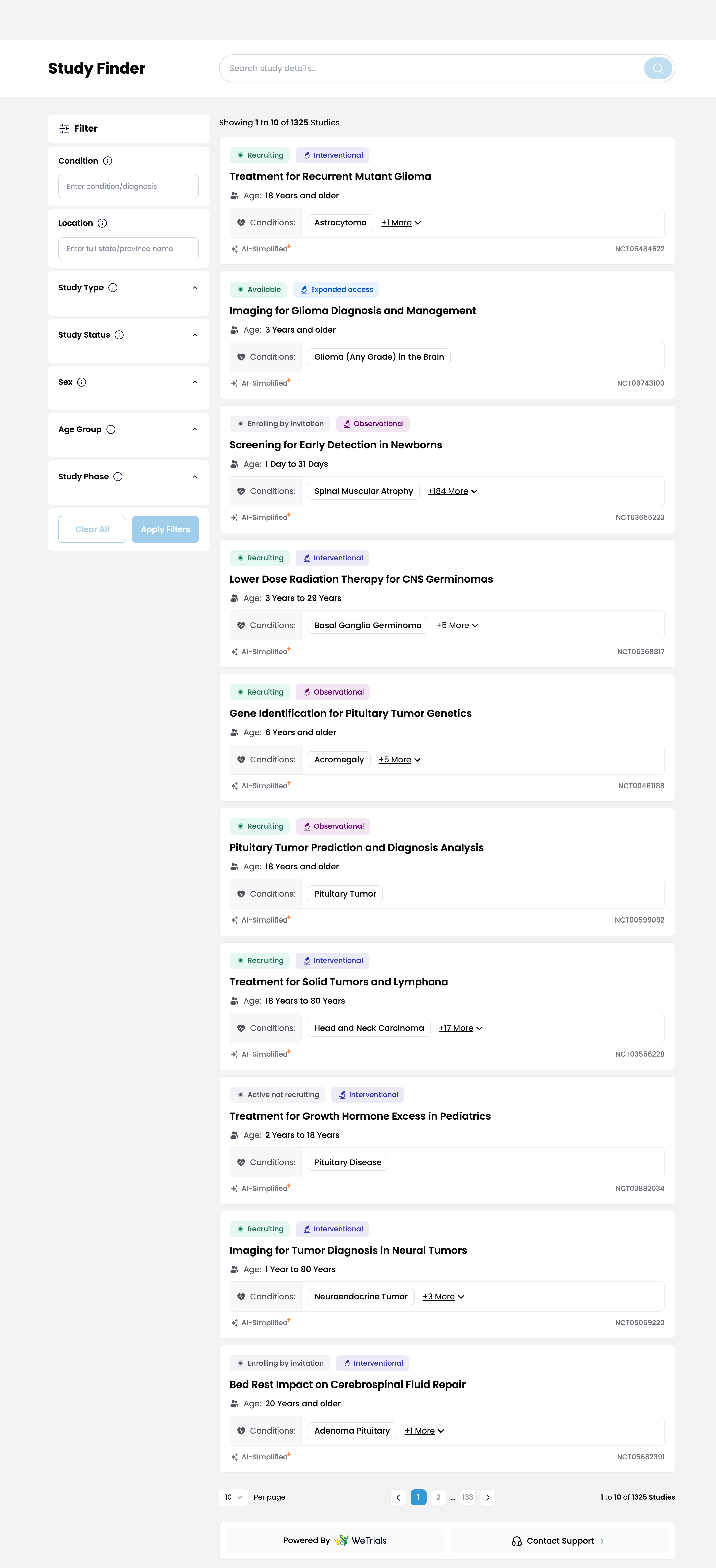 Screenshot: Complete Labrador integration in a production website
Last Updated: September 2025 Maintained By: WeTrials Platform Team